Interesting examples today of innovative internet advertising. In this economy™, companies are finding ad space on the cheap, and Vitamin Water and Apple have two similar but very different approaches:
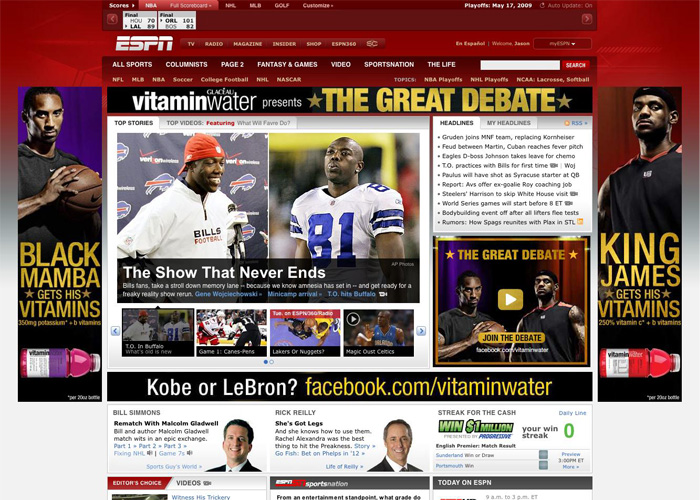
On ESPN.com today, Vitamin Water has 5 ad spaces for their “Great Debate” campaign pitting LeBron against Kobe. Too bad these ads aren’t as good as their TV ads (“You can’t check him!”), and not nearly as awesome as Nike’s Jim Henson throw-back (“whooo!”). Each ad by itself looks fine, but the 4 ads together overwhelm the page and is uninspired and tired, if not annoying.
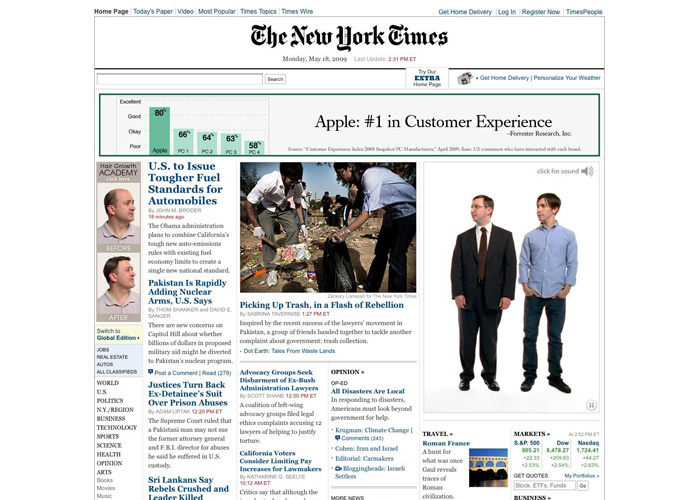
Apple, on the other hand, took over NYTimes.com today with a totally different approach. They’ve got 3 ad spaces here, and each ad interacts with each other. The PC and Mac characters point up to the bar graph, and the Hair Growth Academy guys start pitching in with their opinions mid-way. They’re clearly having some fun here, and employing a much more interesting and engaging experience.
Apple clearly takes the cake on this one, and my guess is they’ll see a better return on those ad dollars as viewers’ eyes stay on their ads for longer and that little Apple logo gets burned ever so deeper into our brain matter.
Just a friendly reminder: if you find yourself in a rut, change something. Change your surroundings, your music, the food you eat, the books you read, or the sites you visit.
You can’t expect your designs to be fresh if your life is stale.
Fantastic article by Khoi Vinh. I couldn’t agree more with this.
Found this accessibility plug in for Firefox by Jon Gunderson, Illinois Center for Information Accessibility. It includes information on your site’s navigation, scripting, styles; generates reports for accessibility and validation based on FAE rules and W3C standards; and provides keyboard enhancements to test binding.
BumpTop releases for Windows.
Sometimes designers like to talk about things that they don’t really understand. Rob Foster sent me the following link today because it explains a concept neither of us really understood well enough to explain (polymorphism), and it turned out to be the best description of REST I’ve run into yet. If you make things for the internet, please read this.
“Certainly looking through the medical records is a lot cheaper than going and doing a bunch of human or animal studies.”
It might seem a little like cheating, but Wired Science has an interesting article discussing the application of new technology and understanding to old and forgotten, but effective, medical procedures. Isn’t the recombination of old and new the essence of innovation?
Interesting Alertbox from Jakob Nielsen finding that “non-profits would collect much more from their websites if only they’d clearly state what they are about and how they use donations. ... Sadly, only 43% of the sites we studied answered the first question on their homepage. Further, only a ridiculously low 4% answered the second question on the homepage.” In other words, content usability and message design are as important as functional usability, especially if you are asking for money!
Don’t forget Northtemple’s Twitter feed, which is a fancy regurgitation of our website content. Many of our designers are also on Twitter, and you can find em by who the Northtemple account is following.
The Dexo UX design conference survey might help you get an idea of what that conference you plan on attending will be about. I can’t verify the accuracy of the data, but it looks like it has potential to be an interesting and potentially helpful resource.
An interesting post from PK at BibliOdyssey with pictures from Stammbücher or “Friend’s Books.” An interesting custom from the 17th century where a person would carry a book with them containing sentimental inscriptions, quotes, and memories from one’s friends. PK calls it: Facebook in the 1750’s
Ignite SLC is next Thursday – it’s an O’Reilly event that gathers over a dozen speakers, allows 20 slides each and just 15 seconds per slide. All local. Design + tech. Looks fun.
Joel Splosky’s How to be a Program Manager is a near spot-on description of our Design Manager / Interaction Designer position here, minus the pesky HTML/CSS role we keep clinging to.. UE + functional spec + customer liaison.
This is nifty.
Nothing groundshakingly new here, but good reminders on how to optimize your links for search engines. (By Gyutae Park, via LDS Media Talk).
For anyone out there who ends up creating images for titling (because sIFR is too complex to set up or otherwise) I recommend Cufón (pronounced koo-fone, like “I love the features of the iPhone.” “Yeah, it’s a pretty koo-fone.”)
It creates an image of your text on the fly with javascript. It uses the canvas element in all browsers that support it and for IE it uses VML.
I haven’t run it though any extensive tests but in everything I’ve tried it seems very promising. They are aware of some current limitations, foremost among them being selectable text. They’re working on a solution. Check it out; it may save you some Photoshop time and bandwidth costs.
The Crisis of Credit by Johnathon Jarvis describes the source of our economic situation with a great use of audio, animation, and a clever voice over script.
Adobe released an optional plug-in for Photoshop today that disables the multi-touch zoom and rotate features introduced with the new CS4 and unibody MacBook combination. While I find many of the new multi-touch gestures quite handy, I agree with John Nack that “on the latest systems (with the enormous trackpads), it can be too easy to zoom or rotate accidentally.” The most frustrating part though is there is no way to reorient the image back to zero degrees once you have rotated it. I am surprised that such an oversight made it to production. Honestly, if the rest of the Photoshop user-base rotate images as infrequently as I do, I feel safe in my assumption that the implementation of this feature was motivated more by marketing than research.
The article skimmer interface from NTY is a great example of an alternative way to browse a newspaper. All I’ve ever done is “skim” the newspaper, so this seems like the NYT edition for me. (via Daring Fireball)
For those of you who do not follow John Gruber I wanted to relink this book sale by Sitepoint. They’re selling your choice of 5 books (in PDF format) for $30. 100% of the money goes to help people affected by the fires in Australia. So if you need an excuse to get a bunch of decent web related reading material (Web Design, Javascript, CSS, HTML, AJAX, Rails, PHP, ASP, etc), you’re not going to find a better one.